Developer Offer
Try ImaginePro API with 50 Free Credits
Build and ship AI-powered visuals with Midjourney, Flux, and more — free credits refresh every month.
AI Supercharges Microsoft Photos On Copilot Plus PCs

Windows Insiders using Copilot+ PCs now have the opportunity to explore two innovative AI-driven features within the Microsoft Photos app. The first of these exciting additions is named Relight, designed to bring dynamic lighting controls to your pictures.
AI Powers Up Microsoft Photos on Copilot+ PCs
The Relight feature was initially unveiled in early May. It was introduced as a component of the upcoming wave of Windows experiences that Microsoft showcased alongside its new 12-inch Surface Pro and 13-inch Surface Laptop devices. This feature is making its debut on Qualcomm-powered Copilot+ PCs, with plans to extend support to AMD and Intel models in the subsequent months.
Introducing Relight: Dynamic Lighting at Your Fingertips
The Windows Insider team provided details on how Relight enhances photo editing:
"You can position up to three light sources, set the light color, and set the focus point where all lights automatically point. Brightness and intensity controls provide additional fine-tuning to achieve the desired effect. For quicker edits, built-in presets offer ready-made lighting styles that can be applied with a single click."
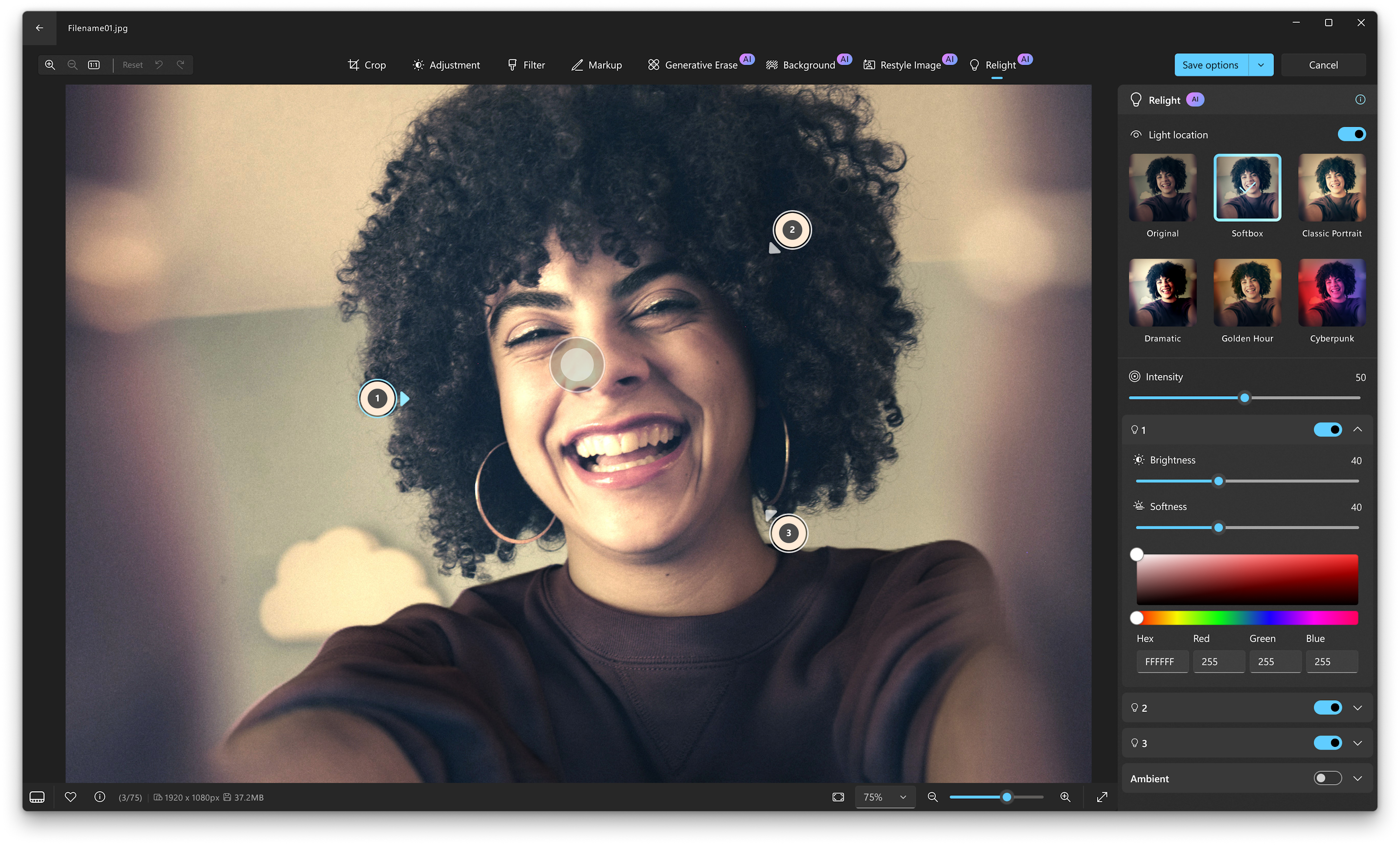
Find Photos Faster with AI-Powered Natural Language Search
Beyond lighting adjustments, the Microsoft Photos app on Copilot+ PCs is also integrating semantic, natural language search capabilities. This is similar to the search functionality already present in the Windows Search bar on the taskbar. It allows Insiders to search for their photos using conversational language. However, this feature is currently limited to photos that are stored locally on the device and have been indexed by the system.
More for Insiders: Restyle Image, Image Creator, and Availability
This latest update also activates the Restyle Image and Image Creator features for Windows Insiders who are logged in with a Microsoft Entra ID account. The update for the Microsoft Photos app, containing all these new AI enhancements, is currently being rolled out across all Insider channels.
Compare Plans & Pricing
Find the plan that matches your workload and unlock full access to ImaginePro.
| Plan | Price | Highlights |
|---|---|---|
| Standard | $8 / month |
|
| Premium | $20 / month |
|
Need custom terms? Talk to us to tailor credits, rate limits, or deployment options.
View All Pricing Details

