Developer Offer
Try ImaginePro API with 50 Free Credits
Build and ship AI-powered visuals with Midjourney, Flux, and more — free credits refresh every month.
Facebook AI Now Turns Your Photos Into Posts
Turn Your Hidden Photos into Shareable Memories with AI
Your phone's camera roll is likely filled with countless photos you've never posted—moments you intended to share but never found the time to perfect. Facebook is aiming to change that with a new feature powered by Meta AI. This tool automatically spots the hidden gems in your photo library, polishes them up, and creates simple, elegant collages ready for you to share. You capture the memories, and Facebook’s AI helps transform them into posts, no design skills needed.
Why Meta Launched the AI Photo Assistant
Many people hesitate to share photos because they don't feel the images are "post-worthy" or they lack the time to edit them. Meta's new feature is designed to overcome this hurdle by helping you rediscover and share moments that might otherwise remain unseen. From Meta's perspective, this initiative is also a key part of its broader strategy to integrate more artificial intelligence-driven features across its family of apps.
Behind the scenes, the AI analyzes photo details like lighting, subjects, and events to intelligently group similar moments. It then automatically generates polished collage layouts and can even suggest captions or filters. However, you always have the final say and can edit or reject any suggestion before posting.
How to Enable the AI Photo Feature on Facebook
If you want to try this feature, you can turn it on within the Facebook app. Here’s how:
- Open the Facebook app on your iOS or Android device.
- Tap your profile picture or the menu icon to open the menu.
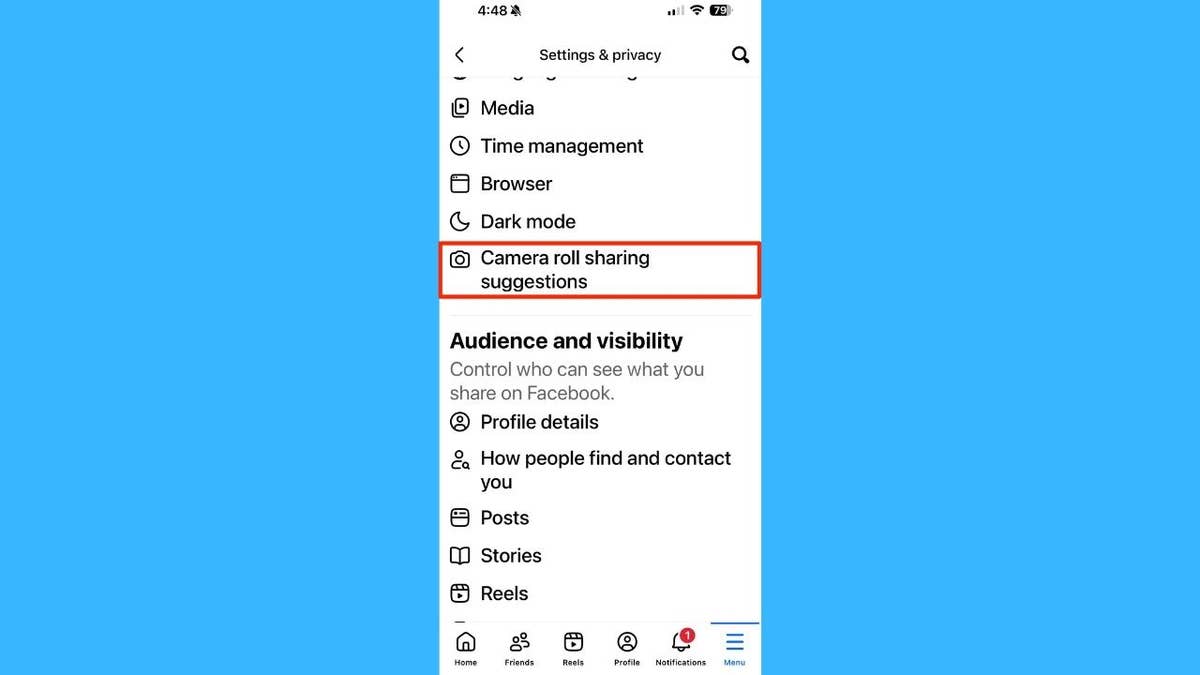
- Navigate to Settings & Privacy, then tap Settings.

- Scroll down to the Preferences section and find Camera Roll Sharing Suggestions.
- Toggle on the option labeled 'Get creative ideas made for you by allowing camera roll cloud processing.'
- You will be asked to allow "cloud processing," which means you are giving Facebook permission to upload photos from your device to its servers for Meta AI to analyze.

Once enabled, Facebook will notify you when new collage suggestions are ready for you to review, edit, and share.
How to Disable the Feature and Manage Your Data
If you're concerned about privacy or simply don't like the feature, you can easily opt out:
- Follow the same path: Settings & Privacy → Settings → Preferences → Camera Roll Sharing Suggestions.
- Toggle the feature off or disable "cloud processing."
- For an extra layer of privacy, you can also revoke Facebook's access to your camera roll entirely through your phone’s main operating system settings.

If you've already allowed photos to be uploaded, Meta states that you can delete that data by turning off the feature and then clearing the saved files under the "Your Facebook Information" section in your Settings.
The Pros and Cons of AI Curation
This new feature introduces both convenience and important considerations for users:
- More Sharing, Less Effort: It significantly lowers the barrier to posting, helping you share moments without the fuss of editing.
- Rediscover Old Memories: Photos buried deep in your camera roll can get a second life and be shared with friends and family.
- You Remain in Control: All suggestions are shown only to you, and you have the final decision on whether to edit, save, or share them.
- Major Privacy Considerations: Opting in means your photos are uploaded to Meta's cloud servers. While Meta confirms this data is not used for ad targeting or facial recognition, it is temporarily stored for processing. This trade-off between convenience and data privacy is a key factor to consider.
- Limited Rollout: For now, the feature is only available to users in the U.S. and Canada.
The Future of AI in Your Social Feed
Facebook's AI photo assistant is a clear example of how artificial intelligence is being quietly integrated into the daily apps we use. It addresses a common issue for users—having too many photos and too little time—by offering an automated solution. Whether you embrace this feature for its convenience or opt out due to privacy concerns, it highlights a growing trend that places powerful AI tools directly in our hands, reshaping how we create and share content online.
Compare Plans & Pricing
Find the plan that matches your workload and unlock full access to ImaginePro.
| Plan | Price | Highlights |
|---|---|---|
| Standard | $8 / month |
|
| Premium | $20 / month |
|
Need custom terms? Talk to us to tailor credits, rate limits, or deployment options.
View All Pricing Details

